Desktop CNC vs Laser Engraver: Which Tool Should You Start With?
The dream of building a profitable custom manufacturing workshop in your garage or spare room has never been more achievable. Small-scale fabrication technology has advanced so rapidly that high-powered, precise tools no longer require industrial floorspace or massive commercial bank loans.
However, if you are an independent creator, a DIY hobbyist, or an aspiring e-commerce entrepreneur looking to buy your first major workshop tool, you will quickly find yourself at a crossroads: Should you invest in a Desktop CNC Router or a Laser Engraver?
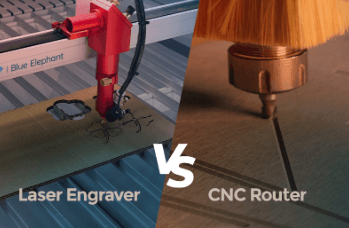
While both machines take digital designs ($CAD/SVG$) and turn them into physical products, they use completely opposite physics, require different working environments, and excel at entirely different materials. Let’s compare them side-by-side to find out exactly where you should start.
The Core Technological Difference
To make an informed decision, you must understand how these tools interact with your raw materials.
- Laser Engravers (Thermal Power): A laser cutter uses a highly focused, intense beam of light to burn, vaporize, or slice through flat sheets of material. It is completely non-contact, meaning no physical force touches the workpiece.
- Desktop CNC Routers (Mechanical Force): A CNC router uses a high-speed spinning cutting bit (spindle) to physically carve, drill, and plow through solid blocks of material. It relies on raw horsepower and physical friction.
[Laser Engraver] ➔ Uses Light (Thermal) ➔ Vaporizes Surface ➔ Best for Flat Details
[CNC Router] ➔ Uses Spinning Bit ➔ Carves Deeply ➔ Best for True 3D Depth
Evaluating the Beginner Learning Curve
For absolute newcomers, the software setup, material safety, and workflow differences can feel overwhelming.
If you are struggling to map out parameters like smoke ventilation setups versus loud workshop noises, reading a comprehensive CNC vs laser engraver for beginners guide can help you match your home’s spatial limitations with your technical skill level.
Generally speaking, laser engravers have a shorter learning curve. You import a 2D image or vector into a program like LightBurn, set your speed and power, and press start.
CNC routers require more preparation. Because the machine physically pushes a metal bit through tough materials, you must master “Feeds and Speeds” (how fast the machine moves vs. how fast the tool spins) to avoid snapping expensive bits or burning your wood grain.
Material Capabilities: What Can They Actually Make?
| Feature / Capability | Laser Engraver | Desktop CNC Router |
| Primary Materials | Plywood, Acrylic, Leather, Glass, Cardboard | Hardwoods, MDF, Plastics, Aluminum, Brass, Carbon Fiber |
| 3D Relief Carving | No (Limited to flat engraving or stepped layers) | Yes (Flawless curved 3D contours and landscapes) |
| Max Material Thickness | Typically cuts up to 10mm–15mm wood per pass | Can cut through thick 50mm–100mm blocks easily |
| Processing Speed | Extremely Fast (Engraves highly detailed logos in minutes) | Moderate to Slow (Multi-hour layer-by-layer clearing passes) |
| Workshop Environment | Silent operation; requires open windows or exhaust vents for smoke | Loud spindle noise; generates heavy sawdust and flying wood chips |
Upgrading to Commercial Scale: When 3D Depth Matters
If your creative goals go beyond marking flat wallet cards, engraving drinking tumblers, or cutting thin acrylic keychains, a laser will eventually hit a physical barrier. Lasers cannot carve a smooth, rounded bowl, create inter-locking mortise-and-tenon woodworking joints, or cut deep 3D portraits into solid planks of oak or walnut.
When you are ready to handle true dimensional woodworking or light metal fabrication on a commercial level, you need a heavy-duty mechanical frame.
The Two Trees 6050 CNC machine is engineered precisely for this step up. Featuring an expansive $600\text{mm} \times 500\text{mm} \times 100\text{mm}$ workspace and dual industrial-grade ball screws, this platform handles the high torsional stress of cutting dense hardwoods and non-ferrous metals daily without flexing. Its fully enclosed transmission rails keep flying sawdust out of the internal mechanics, solving the single biggest maintenance headache of desktop woodworking.
See also: How to Balance Part-Time Work and Studies with Expert Assignment Help in Canada
The Ultimate Decision Matrix: Which is Best For You?
Go with a Laser Engraver if:
- You have limited space (like an apartment or small office) and can easily vent smoke out of a window.
- Your business model focuses on high-speed customization, such as personalized leather patches, engraved wedding favors, or flat acrylic earrings.
- You want a tool that works out of the box with minimal mechanical troubleshooting.
Go with a Desktop CNC Router if:
- You want to work with real, thick hardwoods, furniture panels, or structural aluminum components.
- You love the tactile feel of classic woodworking but want computerized accuracy ($\pm0.05\text{mm}$) for perfectly repeatable joints and pockets.
- You have a garage, basement, or outdoor shed that can handle the loud operational noise and dust generated by a high-torque spindle.